Agentic work, November 2026
This post is a time capsule of "agentic work" in late 2026: directing autonomous software agents that read files, run commands, edit code, and loop on errors in a project folder. An AI assembled it by interviewing me and inspecting my project folders.
Recent projects
What have you been working on recently, and how do you structure the work across projects?
I usually keep two or three projects active at the same time, with agent sessions running in parallel in separate folders. My recent list covers eight projects across games, security, and research. Three show what agents handle right now:
chalo-chalo-unity-project(reviving an old game, April to November 2026). I revived a ten-year-old Unity game to add major features we had always wanted to include, but could not previously justify for such a niche title: computer-controlled opponents that navigate the levels, and phone controllers so players can join from a mobile browser by scanning a QR code. After deploying, playtesters hit weird device-specific bugs across iPhones, Android phones, Steam Deck, and regional Windows settings. Agents tracked down the causes and built automated tests so the fixes would stick.godotbughunt_4_7(security audit, June to November 2026). A security audit of the open-source Godot game engine (version 4.7) and its Steam multiplayer add-on (GodotSteam). Agents found six security bugs in Godot, built the reproduction projects, and drafted the reports, which I sent to the Godot security team. So far, three have received public CVE identifiers (vulnerability tracking IDs):CVE-2026-110734(a memory bug in the high-dynamic-range (HDR) image loader),CVE-2026-110735(a memory bug in the binary resource loader), andCVE-2026-110736(a memory-read bug in the translation loader). The audit also turned up a seventh bug inGodotSteam(CVE-2026-123017, now fixed) that let any player take over the game host's role. Agents drafted public security advisories, published as Three memory safety bugs in Godot's untrusted file parsers and Any networked co-player can act as the server in a GodotSteam game, and ran daily monitoring scripts until I wound the project down in mid-November.lidar-archaeology/BarrowBench(research benchmark, November 2026). An open benchmark (dataset and test suite for AI image-recognition models) for spotting archaeological features such as charcoal kilns, grave mounds, burial cairns, and pit traps in Norwegian airborne laser-scan (LiDAR) elevation maps across three regions. Agents pulled records from Norway's public heritage database, figured out how to place automated data orders with Norway's national terrain portal, watched my email for the download links, downloaded more than 220 gigabytes of elevation archives, rendered over 44,000 terrain map images for the first region alone, and set up geographic cross-validation (keeping separate map blocks held out for testing so a model cannot rely on nearby landmarks).
Five other projects round out the list:
llm_ghost_game: A game prototype that runs a large language model (LLM) during gameplay, paired with a smaller custom-trained "judge" model to stop the ghost from saying things it is not supposed to.sim_game: A turn-based grid combat prototype with fully repeatable, deterministic rules.ghostquest_procgen: A card-based grid puzzle game prototype with automatically generated levels, borrowing gameplay rules from Axe Ghost, an earlier shipped game.bullshitcommand: A small-squad tactics game prototype built around giving spoken orders via voice command recognition.stats-grind: A pipeline that checks published medical studies for mathematical impossibilities.
Tools and daily setup
What actually sits on your screen when you work?
My main interface on both desktop and phone is Paseo. Like other agent workspace apps, Paseo puts projects tied to folders and their conversation sessions on the left, and displays the active conversation plus any open visualizations in the main area. On mobile, I use Paseo to check on tasks when I am out of the house or running errands.
Inside Paseo, I use schedules for work that runs on a repeating timer or for a one-time future task, such as checking for movement on any of the Godot security issues on GitHub, or watching Gmail for completed Norwegian terrain exports. I use heartbeats when a schedule needs to post back into a specific ongoing conversation, so an agent can send updates during a long job and ping me when it finishes.
Inside Paseo, I run Pi, a command-line AI coding agent, connected to models from two providers: GLM-5.3 and GLM-5.3 Flash from z.ai (on a z.ai Max quarterly subscription), plus DeepSeek v4.1 Flash 1017 (DeepSeek Flash) via DeepSeek's pay-as-you-go developer service (API) to cover quota shortfalls.
Lately I have also been running Antigravity, a separate agent desktop app, alongside Paseo to try Google's Gemini models. I was impressed by the prose from Google's Carbon model (a Gemini model) and worn down by GLM-5.3's stiff, recognizable AI writing habits (often called "claudespeak" after Anthropic's Claude models, or "LLMisms") and its failure to follow instructions about how to write. Today I pick Antigravity whenever I have enough quota left to expect the task to finish. I am on Google's Gemini Pro plan ($20 per month) and considering moving to the $100 per month tier.
Locally I work on a desktop with an older consumer graphics card (an RTX 2060), which cannot handle model training. When I need to fine-tune a small judge model, as in llm_ghost_game, I rent a cloud graphics card on RunPod.
You also run a layer of local files, command-line tools, and custom extensions around those workspaces. What forced each one into your toolkit?
Each piece grew out of a real friction point. Most are project files or command-line tools I use in both Paseo and Antigravity, while the last two are custom extensions for Paseo and Pi:
-
chainlink: A local, file-based issue tracker for tasks, dependencies, and session handoff notes so sessions stay anchored without a web tracker. -
DECISIONS.md: A per-project record of binding rules and design choices. This file ensures that new agent sessions honor decisions settled in earlier sessions instead of quietly overturning them. -
AGENTS.mdas an index: The per-project instruction file that agents load when a session starts. Always-applicable instructions sit at the top, followed by links to topic-specific files that an agent should read into its context window (its working memory for the current session) only when relevant. The point is saving context-window space and usage allowance. I do not know whether it actually works, because I am not running tests on it, though it feels like it should help. how i feel explaining llm -> llm adversarial review to non ai types
-
Roast(lightly modified): A command-line tool for automated adversarial code review, where a second AI model critiques the working model's changes. Complex code is rarely bug-free on the first pass, and looping an adversarial reviewer over a change usually catches several real issues. People who do not use AI often believe that having an AI check over AI work is not helpful. People who do use AI know that it is extremely, "unreasonably", helpful. -
slopcheckandJev: Automated prose and clarity checkers (slopcheckflags AI clichés and readability issues;Jevflags overly dense, jargon-heavy paragraphs) that I have used mostly to nudge GLM models toward plain, natural writing. That has not been completely successful; Gemini models handle writing style much better out of the box. -
git-guard(Pi extension): A custom extension that blocks destructive commands in the Git code-tracking tool. Once an agent deleted a Git worktree (a separate working folder copy of a project). The work was recovered, but that scare was enough to put a hard block in place. -
Usage(Paseo extension): A custom extension that plots my z.ai subscription usage over time so I can see my burn rate and avoid being caught off guard when my allowance runs dry.
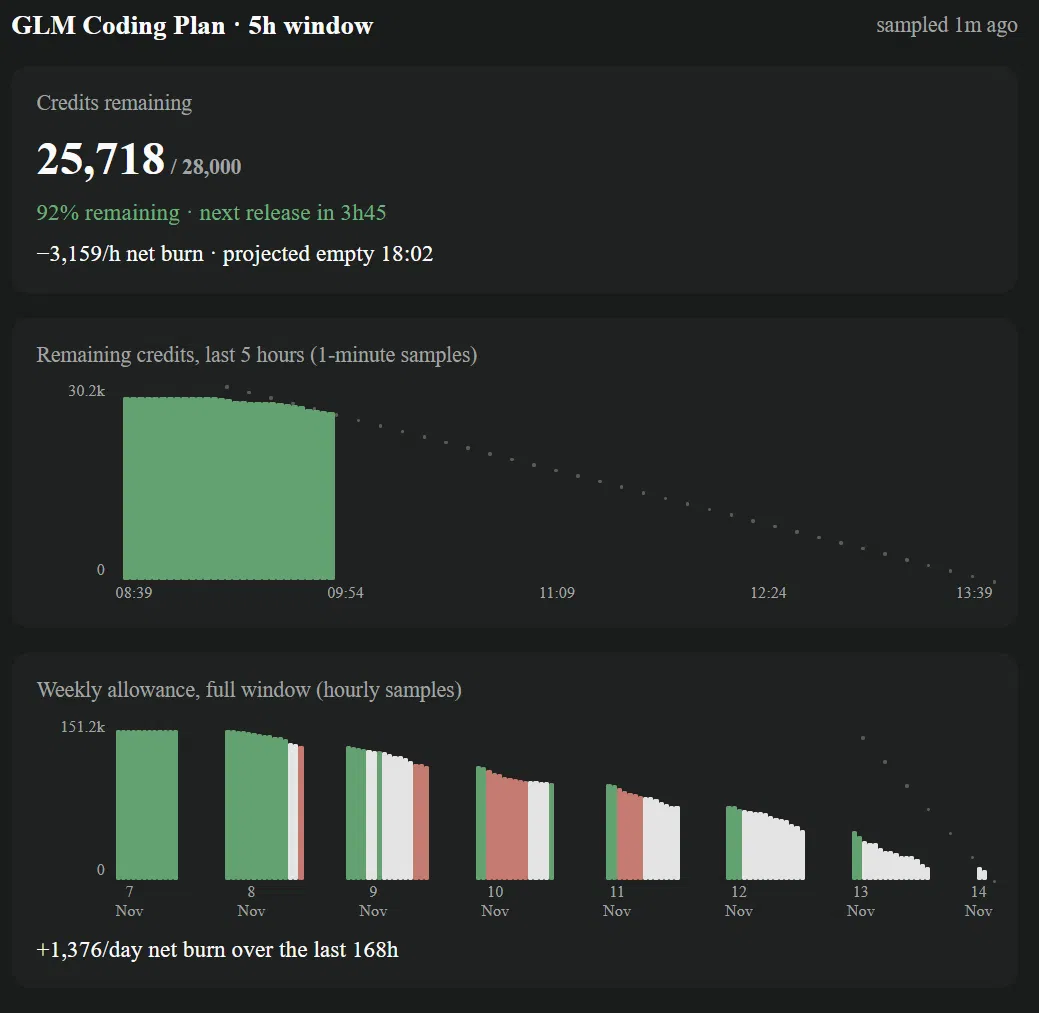 My Paseo Usage extension, tracking subscription quota over time: white means I am on track for usage to run out just around the time it will renew.
Division of labor
How much code do you still write by hand?
None. I have written no code by hand for more than a year.
Agents write all of the code, build automated tests, hunt for security bugs, assemble working demos, figure out undocumented web interfaces, manage multi-hour downloads and map renders, draft routine emails and advisories, review each other's changes in adversarial loops, and monitor long-running tasks on schedules.
If agents write all the code, what work do you still keep for yourself?
Maybe the most important part of the work is deciding what to direct agents to do. Beyond that, I keep the work I want to do or cannot get AI to do at all. Away from the computer, I think through problems, sketch, and decide what to build and when to stop. During projects, I set binding rules in DECISIONS.md, steer sessions, draft or heavily edit prose so it reads well, playtest builds, and mentally simulate gameplay to evaluate whether an idea is fun. Later in game projects, I also make the artwork, music, and sound effects myself so they stay consistent and match my taste; I will not use AI for audio or visual work.
make_a_breakthrough: pointing agents outside your own expertise
You named the parent folder for your medical statistics and LiDAR archaeology projects make_a_breakthrough. Was that half-joking or dead serious?
The intent was to probe whether I could direct an LLM to do something outside my areas of expertise where a new finding would actually matter.
Two things convinced me it was worth trying: seeing amateurs use LLMs to solve famous open math problems (the Erdős conjectures), alongside a public Reddit writeup of someone finding an exoplanet candidate in public NASA telescope data, and my own success finding security bugs in Godot without once looking at the source code myself.
Nothing shifted in me when I moved from games to those projects. LLMs are amazing tools, and I wanted to see what I could do with them without keeping such a tight hold on the reins.
What gives a field the right shape for an autonomous agent grind, and what ideas did you skip?
A good target has three traits: it has not been picked over already, solutions can be verified mechanically, and a hit has real upside in insights or improvements.
During the initial scan, I passed on fields that were already crowded or messy to verify, such as mining public biology and genetics databases, checking laboratory DNA records for mismatches (easy to verify mechanically, but smaller impact), and scanning digitized historical newspapers for unrecorded auroras or meteorite falls. I also took a brief detour into automated photo geolocation (pinpointing where a landscape photo was taken without location metadata, inspired by investigative journalists at Bellingcat) before focusing on medical trial statistics and then Norwegian LiDAR archaeology.
How does it feel different when an agent turns up something real in the world instead of inside a game prototype?
Exciting, and also stressful, because I lack the domain expertise to validate the result myself. So much of the work becomes figuring out how to double-check results from scratch.
In the Godot bug hunt, verifying results was easy: LLMs can create reproductions and working exploits that prove the bugs are real. In the medical paper grind, it was much harder. My agents and I separated reading from math: language models extracted reported numbers from open-access medical trials, deterministic scripts recomputed the statistics, and flagged papers went through a council of three models (GLM-5.3, Anthropic's Claude Sonnet 5.5, and ChatGPT) critiquing each other's analysis. Bouncing findings across different models uncovered problems that a single model missed, yet even the machine-validated outcomes still left me with a relatively high degree of doubt.
What are you most afraid of getting wrong when you enter someone else's scientific field armed with agents, and what was it like hitting "post" on your first live comment on PubPeer (a public post-publication peer-review site)?
Wasting people's time and burning goodwill. For those reasons, I want to avoid relying on other people's expertise as much as possible. Across both research projects, the question is: how can we validate a finding mechanically and objectively, or get as close to that as possible?
Actually clicking publish on PubPeer felt appropriately aversive. On one hand, I believed any errors remaining in that comment were no more egregious than what a human commenter might post. On the other hand, an LLM-using non-expert has much less goodwill available to burn. I do not know how people will react. Still, I trust that the errors we uncovered were real, and that the utility of pointing them out in a short comment was worth it.
Why pivot from the medical statistics grind to Norwegian LiDAR archaeology?
The medical grind hit a bottleneck outside my control: once you post a comment, you are waiting for paper authors or journals to respond, which may never happen. I wanted something that can be completed on a timetable I control. Building an open LiDAR benchmark over public Norwegian terrain data gives me that.
Your project rules define a catchphrase, AWOOGA, for an agent to put at the start of a reply when a grinding loop surfaces something important. Why?
Because I run several agents in parallel, my own "context window" gets shredded. I needed quick visual aids so I could tell at a glance whether real progress had been made.
There have been plenty of AWOOGA moments. They feel good, and also funny. I enjoyed watching an agent explain technical details far beyond what I could competently speak about, while politely humoring me by opening with that catchphrase.
When an agent is speaking far above your head, how do you know when to trust it and when to push back?
I know a lot about different domains, not at an expert level, but enough to ask useful questions. In BarrowBench, for example, I questioned the plan to hold out one whole Norwegian region as the test set instead of sampling across all three regions, which led to splitting each region into separate geographic blocks with buffer zones so nearby terrain could not leak between training and test sets.
Sometimes not understanding what the LLM is doing, and pushing back on that, uncovers that the agent was not doing it in the best way. It helps that there are no status games in a conversation with an agent. You can put your entire ignorance on display without embarrassment, which is the fastest way to learn.
Could BarrowBench still fail?
Yes. Even Norway's official archaeological records are messy and noisy enough that they might prevent the kind of automatic verification a project like this needs. That is not settled yet.
When agents are downloading more than 220 gigabytes of Norwegian terrain scans and vetting medical papers for you, what role do you feel like you are playing?
Something with no good name yet. Maybe a catalyst: the person who asks, "What if we pointed this new intelligence at this domain?"
What still goes wrong
Where does this workflow still break down day to day?
- Painful output and invented jargon on long sessions. Reading GLM-5.3 output can be painful, especially late in a long session. The model coins compressed compound nouns inside its internal reasoning notes and drops them into replies as if we shared a vocabulary. It once wrote: "a reaction is spent only when it changes the board; resolution ends on an empty round or a no-change round; fizzles are visible." When I quoted that sentence back with
"ELI16"("explain like I am 16"), it translated itself into "Every enemy gets one 'go' per card you play..." Putting"Always speak plainly. Prefer slightly longer output if necessary to avoid jargon."at the top of a project'sAGENTS.mddoes not reliably stop it. - LLMisms in prose. I ask GLM models to draft emails sometimes, but the LLMisms are very strong and I have to edit them heavily before sending. Checking output with
slopcheckandJevonly gets you partway there. - Quota exhaustion. I still run out of quota, though not as badly since I built the
Usageextension for Paseo and started covering shortfalls with the DeepSeek API. Splitting work across Paseo and Antigravity adds a second calculation: estimating whether a task will fit inside my remaining $20 Gemini Pro allowance.
Looking ahead
When someone reads this snapshot a few years from now, what parts of your November 2026 setup do you most expect to look dated?
Getting a model to write consistently in a requested style will certainly be solved in a few years. Typing "ELI16" to decode private jargon, or bolting slopcheck and Jev onto a model to scrub LLMisms, will look like early-era friction.
I also hope that switching interfaces just to evaluate another model properly, such as moving from Paseo to Antigravity to run Gemini, will stop being necessary.
More broadly, I expect deeper AI integration in future operating systems to make all of this tooling (folder-scoped chat apps, custom usage charts, bolted-on schedules, worktree guards, and hand-maintained decision files) look quite hacky.
Get an email now and then when I publish new things. Leave your address here.